How to split a conversation
- Open the conversation and find the message where the new topic begins
- Click the ⋮ menu on that message
- Choose Split conversation here
- Confirm the split
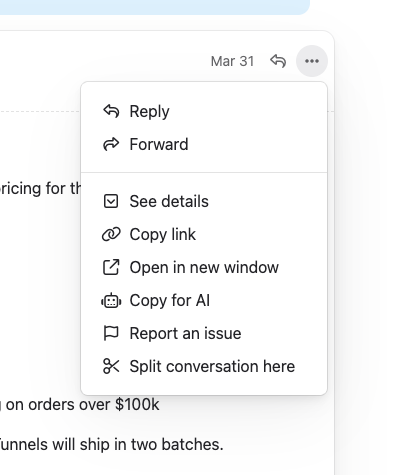
Jelly creates a new conversation starting from the message you chose. Everything before that message stays in the original conversation.
You can only split at the second message or later — the first message in a conversation can’t be split off since it would leave the original empty.
What moves to the new conversation
When you split, the following content from the split point onward moves to the new conversation:
- Messages — the selected message and all subsequent messages
- Comments — any internal comments made after the split point
- Activity — activity entries recorded after the split point
What the new conversation inherits
The new conversation copies several properties from the original:
- Subject — same subject line
- Status — inbox, archived, or snoozed
- Mailbox — same mailbox
- Assignments — same team member assignments
- Labels — same labels applied
- Subscriptions — same team members subscribed
- Bookmarks — same bookmarks
This means the new conversation starts in the same state as the original, so nothing falls through the cracks.
The new conversation inherits the original’s subject line, so after splitting you’ll probably want to update it to reflect the new topic. Click the subject at the top of the conversation to edit it. This change is only visible to your team — the people on the other end of the conversation won’t see it.
Navigating between split conversations
After a split, the new conversation shows a Split from link at the top with the original conversation’s subject. Click it to jump back to the original.
This makes it easy to follow the history when a conversation has been split.
When to split
Splitting is useful when:
- A customer changes topic — they reply to an old thread about a new issue, and you want to track each issue separately
- Multiple questions in one thread — different team members need to handle different parts, and splitting lets each part be assigned independently
- Keeping things organised — a long thread has become unwieldy, and splitting helps keep each topic focused