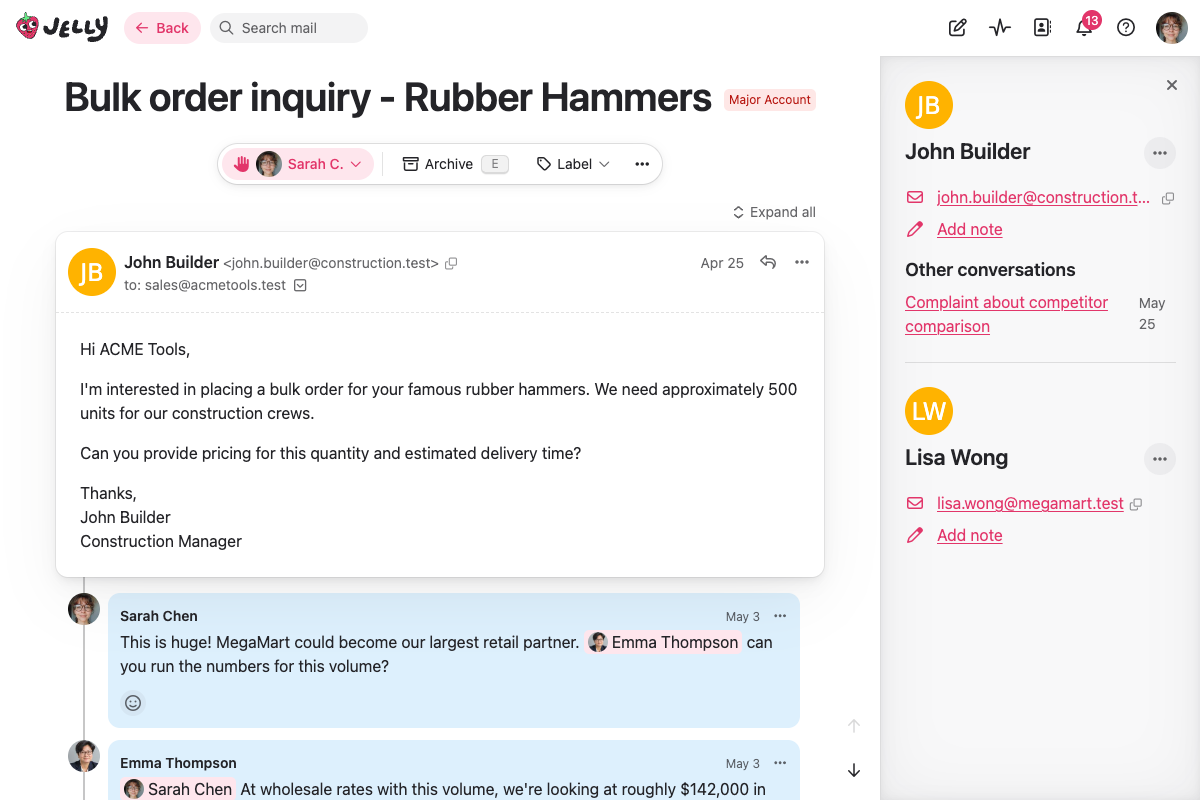
Opening and closing the sidebar
Click a sender’s name at the top of any message they’ve sent and the sidebar slides open with their details. Click the ✕ in the top corner of the sidebar to close it again.
Jelly remembers whether you like the sidebar open or closed, so once you’ve set it the way you want, it stays that way as you move between conversations.
On smaller screens the sidebar would crowd out the conversation, so clicking a sender’s name there takes you to the full contact page instead.
What the sidebar shows
The sidebar pulls together everything Jelly knows about the contact:
- Name and avatar — who you’re talking to at a glance
- Email addresses — their primary address, plus any extra addresses on the contact. Use the copy button to grab an address, or click it to start a new conversation
- Labels — any labels applied to the contact, which you can remove right from the sidebar
- Links — handy links you’ve saved for this contact, such as their account in another system
- Note — a free-form note about the contact. Click the pencil to add or edit it
Acting on a contact
The ⋯ menu next to the contact’s name lets you take action without leaving the conversation:
- Open contact — open the full contact page to change their name, addresses, links, and more
- Block this contact — send future messages from them straight to spam
- Never flag as spam — make sure their messages always reach your inbox
Other conversations
If you’ve spoken to this contact before, the sidebar lists their other conversations underneath, most recent first. Click any of them to jump straight there, or See all conversations if there are more than a handful.
This makes it easy to pick up the history with someone — you can see at a glance whether this is a first-time enquiry or a long-running relationship.
Conversations with more than one contact
Some conversations involve several people. When that happens, the sidebar shows a section for each contact, so you have everyone’s details in one place. Clicking a particular sender’s name brings their details to the top.