Setting Your Availability
- Go to Settings → Availability
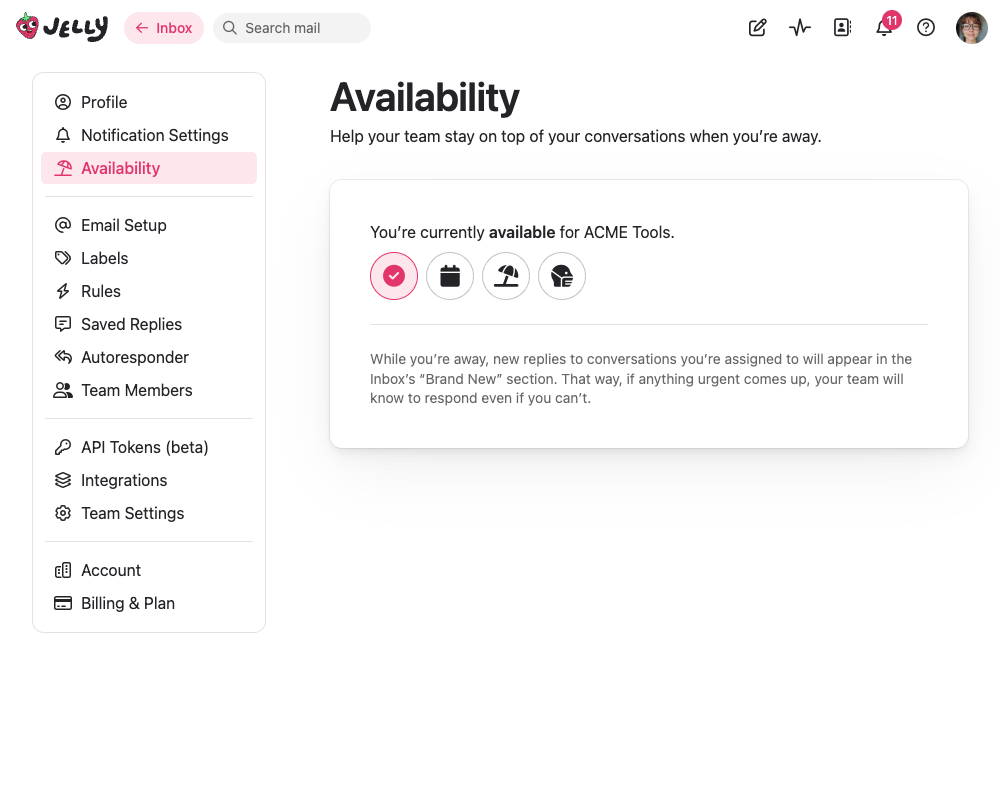
- You’ll see your current status and four buttons:
| Button | Meaning |
|---|---|
| ✅ (checkmark) | I’m back — you’re available |
| 📅 (calendar) | Just away — temporarily away |
| 🏖️ (beach umbrella) | Vacation — away on holiday |
| 😷 (mask) | Ill — away due to illness |
Click any of the “away” buttons to mark yourself as away. Click the checkmark to mark yourself as back.
The three away reasons (just away, vacation, ill) all do the same thing functionally — they just let your team know why you’re away.
What Happens When You’re Away
When you’re marked as away:
- New replies to your assigned conversations appear in Brand New instead of staying in your section, so anyone on the team can see and respond to them
- Your team can see that you’re currently away
That’s it. You’ll still be able to log in and use Jelly normally — the away status is an informational signal to your team, not a lockout.
Multiple Teams
If you belong to multiple Jelly teams, you can set your availability independently for each one. The Availability page shows all your teams so you can update them in one place.
Tips
- Set yourself as away before you leave — Don’t let urgent replies sit unnoticed in your section while you’re out
- Team admins can set availability too — Since we often can’t plan being ill in advance, team admins can also set availability for other team members
- Come back when you return — Remember to mark yourself as available again so new replies route to you normally
- Use it for short breaks too — “Just away” is great for lunch breaks, appointments, or end-of-day on Fridays