What is an Autoresponder?
An autoresponder is an automatic email reply that gets sent when your team receives a message. Unlike rules that organize conversations internally, autoresponders communicate directly with your customers.
Autoresponders help you:
- Set expectations - Let customers know when to expect a response
- Provide immediate help - Send useful information while customers wait
- Handle common scenarios - Automatically respond to frequently asked questions
- Improve customer experience - Immediate acknowledgment shows you’re attentive
Setting Up Autoresponder
- Go to Team Settings → Autoresponder
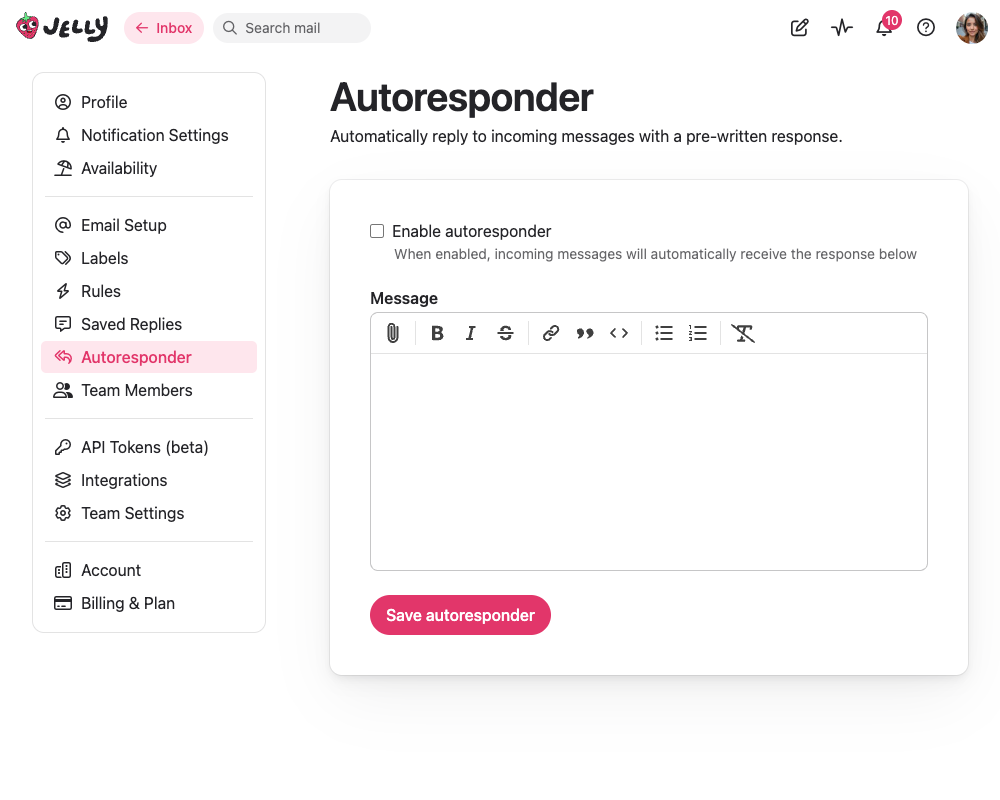
- Write your response message & click Save autoresponder
- Enable the autoresponder
Only admins and team owners can create, edit, and delete autoresponders. Enabling an autoresponder requires an active subscription or trial, but you can write and save your message at any time.
Autoresponder Options
Underneath the message you’ll find two settings that control how the autoresponder behaves:
- Only reply to the first message in a conversation - off by default, so every incoming message gets a response, including replies within a conversation that has already had one. Turn it on when the autoresponse is an acknowledgement (“thanks, we’ve got your message”) that would be strange to repeat every time somebody writes back.
- Mark the conversation as read after replying - on by default, so an answered conversation doesn’t sit in anybody’s inbox looking untouched. Turn it off to leave the conversation unread for the whole team, making it obvious that a person still needs to follow up.
This marks the conversation as read for everybody who can see it. If you use mailboxes, that means every member of the mailboxes the conversation is in.
When Autoresponses Aren’t Sent
Even with an autoresponder enabled, Jelly holds the reply back in a few situations, so that you don’t end up replying to yourself or to another machine:
- Messages from your own team - if the message comes from the email address of one of your team members, no autoresponse is sent. Internal forwards, and messages you send in to test a mailbox, won’t trigger a reply.
- Automated email - anything that identifies itself as machine-generated is skipped: newsletters and mailing list posts, out-of-office and other automatic replies, bulk mail, and bounce notices from addresses like
mailer-daemonorpostmaster. Without this, two autoresponders can end up replying to each other indefinitely. - Spam and blocked senders - conversations that land in Spam, and messages from contacts you have blocked, never receive an autoresponse.
The team member check matches on the exact address, so a team member writing in from a personal or aliased address will still get an autoresponse.
👑 Multiple Autoresponders
This feature is only available on the Royal Jelly plan
With multiple autoresponders, Team Settings → Autoresponders becomes a list rather than a single message. You can write several different responses and let your rules choose between them, so that a message about billing can get a different reply to one that arrives at three in the morning.
The Default Autoresponder
One autoresponder in the list is always marked Default. That’s the team-wide one described above: while it’s enabled, it replies to anything a rule hasn’t already answered. The default autoresponder can’t be deleted, but you can disable it if you only want rules to send responses.
Autoresponders Sent By Rules
Every other autoresponder has a name, which is how you’ll recognise it when you’re building a rule. These are only ever sent by a rule — enabling one doesn’t make it reply to anything by itself.
- Click Create new autoresponder, give it a name like “Out of hours”, and write the message
- Enable it, and save
- Go to Settings → Rules, and add the Send an automatic response action to a rule, choosing your new autoresponder
Deleting an autoresponder doesn’t delete the rules that send it — those rules keep running their other actions, but stop sending an autoresponse.
Which Autoresponder Replies
However many autoresponders match, only one autoresponse is ever sent for an incoming message. Jelly chooses it like this:
- Rules that send an automatic response are checked in the order they were created, and the first one that matches the message sends its autoresponder
- If no rule sends a response, the default autoresponder replies instead
This is the one place rules don’t follow the usual “every matching rule runs” behaviour — a message only ever receives one automatic reply.
A rule is passed over if its autoresponder can’t answer this particular message: it’s disabled, has no message written, has been deleted, or is set to only reply to the first message in a conversation and this is a later reply. Jelly carries on through the remaining rules, so a rule further down the list — or the default autoresponder — can still respond.
When to Use Autoresponders
Good Use Cases
- After-hours messages - “We’re closed, but we’ll respond tomorrow”
- Vacation notices - “Our team is away until [date]”
- Acknowledgments - “We’ve received your message and will respond soon”
- Common information - “Here’s how to reset your password”
- Routing confirmations - “Your message has been forwarded to the right team”
Avoid Using For
- Complex customer issues that need human review
- Sensitive or urgent matters
- Personalized responses
- Situations requiring empathy or nuance