These are shared across your whole team, to make it almost trivial for anyone in your team to deal with simple, common requests.
What Are Saved Replies?
Saved replies are reusable email templates shared across your team. Each saved reply has:
- A reference name — a short title so you can find it quickly
- An optional subject line — automatically sets the email subject when inserted
- Content — the message body, with full rich text formatting
- Attachments — files that get attached to the email when the reply is inserted
When you insert a saved reply, its content replaces whatever is in the compose area, and any attachments are added to the email. You can then edit the content before sending.
Creating Saved Replies
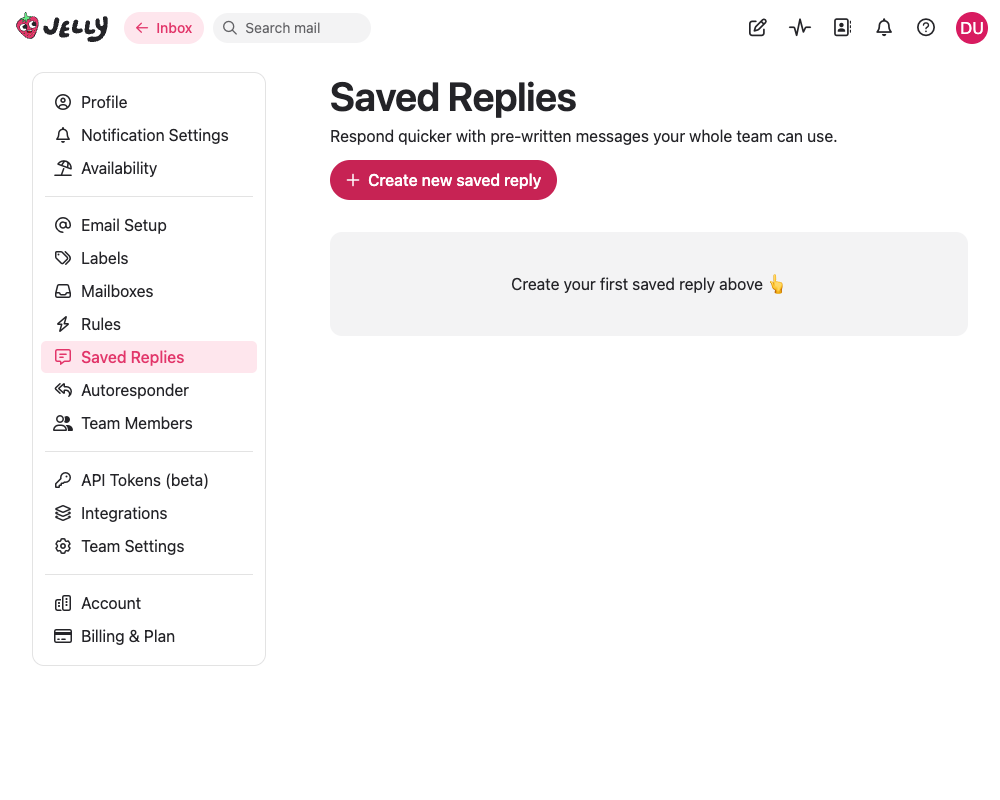
- Go to Settings → Saved Replies
- Click the button to create a new saved reply
- Enter a reference name (e.g., “Password Reset Instructions” or “Refund Policy”)
- Optionally enter a subject line — when provided, this automatically sets the email subject
- Write your content using the rich text editor — you can format text, add links, and include attachments
- Click Save
Only admins and owners can create, edit, and delete saved replies. All team members can use them.
Using Saved Replies
When composing an email reply:
- Click the Saved Replies button in the editor toolbar (it looks like a message icon)
- A list of your team’s saved replies appears, showing each one’s title and a content preview
- Click a saved reply to insert it
The reply’s content is inserted into the editor, its subject line (if any) is applied, and any attachments are added. You can then personalize the message before sending.
Admins also see an Add/edit saved replies… link at the bottom of the list for quick access to manage templates.
Best Practices
Write for Personalization
Saved replies work best as starting points. Write them so they’re easy to customize:
Good: “Hi, I’ve looked into your account and can see what happened. [Explain the issue and resolution here.] Let me know if you have any other questions.”
Bad: “Hi John, your subscription expired on January 15th. Please renew at example.com/renew.”
The first version can be adapted for any customer. The second is too specific to reuse.
Use Descriptive Names
Choose reference names that make it easy to find the right reply:
Good: “Password Reset Instructions”, “Refund Policy Explanation”, “Getting Started Guide”
Bad: “Reply 1”, “Template”, “Stuff”
Keep Templates Current
Review your saved replies periodically and update them when policies, procedures, or product details change. Delete any that are no longer relevant.