How to snooze
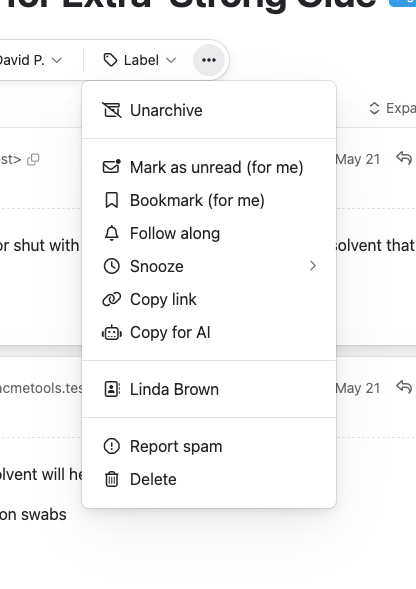
From the conversation view or the conversation list, open the actions menu and choose Snooze. You’ll see four options:
| Option | When it returns |
|---|---|
| Later today | 6 PM today (or 4 hours from now if it’s already past 6 PM) |
| Tomorrow | 9 AM tomorrow |
| Next week | 9 AM next Monday |
| Pick a time… | A date and time you choose |
All times are in your local timezone.
What happens when you snooze
- The conversation’s status changes to Snoozed and it leaves the inbox for everyone
- It appears in the Snoozed section in the Inbox menu (visible when there are snoozed conversations)
- A clock icon appears on the conversation
- Snoozing is recorded in the conversation’s activity log
When snoozed conversations return
A snoozed conversation automatically returns to the inbox when the snooze time expires. You can also manually unsnooze it at any time by opening the conversation and choosing Unsnooze from the actions menu.
After snoozing, you’ll see a confirmation with an Undo option in case you change your mind.